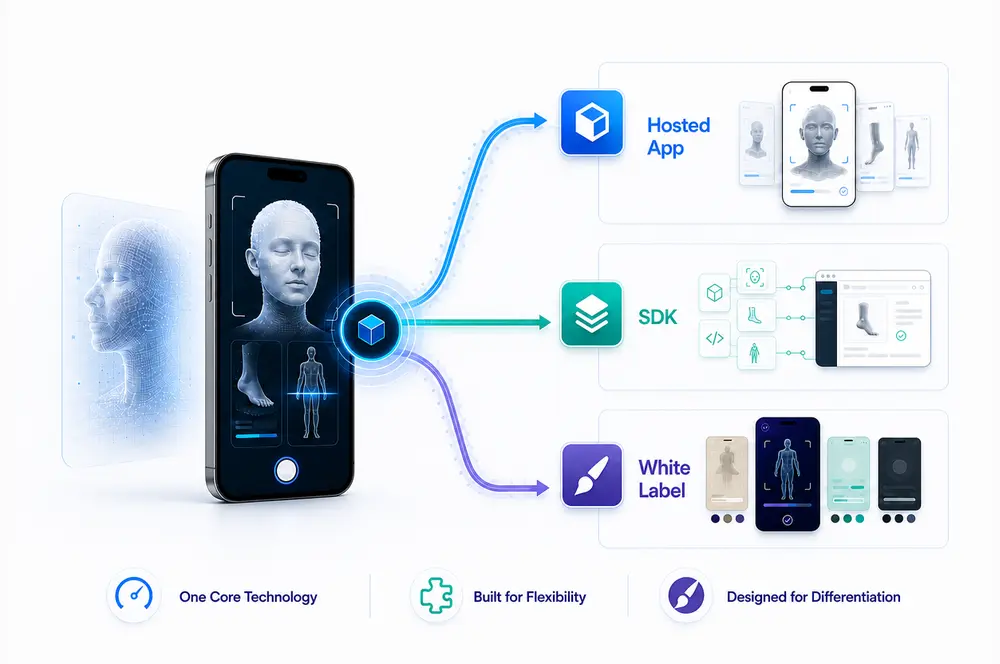
The three delivery models at a glance
1) Hosted App - AstriScan
AstriScan Hosted is Astrivis’ ready-to-use scanning app combined with AstriCloud post-processing and a lightweight integration layer. It can connect to an order system or e-commerce checkout via QR codes, order codes, and webhooks, without requiring a full custom App rollout.
Best for
- Low- to mid-volume teams that need fast rollout with minimal engineering effort
- Webshop and order-driven workflows (QR linking, order codes)
- Distributed intake across multiple locations with centralized export handling
What you get
- Working capture UX out of the box with standardized guidance
- AstriCloud processing and production-ready exports
- Traceability: exports linked to orders or cases
Trade-offs
- Less UI/UX control than SDK
- Standardized capture flow (optimized for multiple industries, not niche UI)
2) SDK Integration
The Astrivis SDK lets you embed face, leg, foot and other scan modes into your own app while using AstriCloud to deliver post-processed outputs via API. This is the right model when scanning must be tightly integrated into your product and systems.
Best for
- Companies with an existing app and an engineering team
- Manufacturers, platforms, and networks that need deep workflow control
- Integrations with ERP, CRM, case management, or custom order logic
What you get
- Full control over the in-app experience and end-user flow
- API-level integration for case IDs, exports, and automation
- The technology scales with your business
- Custom branding, presence in the App/Play Store
Trade-offs
- More engineering effort and longer time to go live
- You own more of the onboarding and operator training outcomes
- Requires clear SLA, versioning, and support definitions
3) White Label
White label is a branded Astrivis app experience designed to help you launch quickly under your own brand, typically as an accelerator before a full SDK build. Depending on the agreement, it can include handover terms designed to give you a kick-start.
Best for
- Teams that want speed-to-market plus brand control
- Commercial pilots where time matters
- A Phase 1 deployment before migrating to SDK integration
What you get
- Faster deployment than building an app from scratch
- Brand control and a proven capture UX
- A clear upgrade path to SDK when ready
Trade-offs
- Long-term maintenance rights must be defined precisely
- You still rely on Astrivis for core SDK and cloud pipelines
- Custom feature requests should be managed through additional SOW
The real decision: control vs speed vs risk
A simple way to choose:
- If your priority is speed and low operational risk, start with Hosted App
- If your priority is deep integration and full workflow control, choose SDK
- If your priority is speed plus branding, choose White Label, ideally with a clear path to SDK later
Choose Hosted App if
- You want to validate in weeks, not months
- You lack mobile engineering capacity
- You need a standard workflow first
Choose SDK if
- Scanning must be embedded in your app and business logic
- You can invest in ongoing UX improvements
- You need API-level integration and full control
Choose White Label if
- You need branding and speed
- You want a proven capture UX now
- You want a stepping stone to a full SDK build later
Next step
If you share your use case (body part, operator type, environment, required outputs), a vendor should be able to propose a short evaluation plan with clear KPIs and a deployment recommendation.
.webp)
.webp)